
Tangent — A Little More About Twitter in the Fine Art of Richard Armitage Watching

I’m not quite sure this is a tangent, since the point is ultimately about Richard Armitage watching, but it feels like a tangent. Hell, this whole blog feels like a tangent. Ahem.

Twitter is a great tool once you get used to it. Yeah, there’s a bunch of bs that goes on there, but it’s one of the quickest ways to find out information; however, you’re at a disadvantage if you’re only using Twitter to well, access your Twitter account. With the advent of Twitter, Facebook, et al, there had to be something on the scene to manage them easily. I use Hootsuite. The best thing about it for me is the ability to see several things at once. I can watch tweets on my account stream and also show streams for searches of which I can make a permanent stream or do one on the fly, like oh let’s say The Rover. Yes, I’ll explain a stream.

Here’s what my Hootsuite Dashboard looks like, and please don’t let it overwhelm you. It’s really a lifesaver, or maybe just a headache saver because you can get lost just navigating your Twitter pages without it.
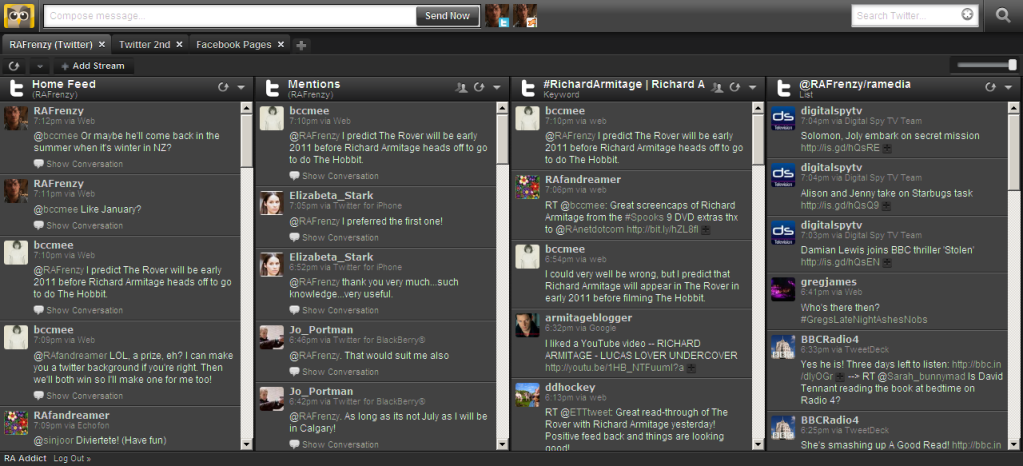
Click on image to enlarge.

The first stream is my account stream or what I would see on the home page of my Twitter account. The tweets showing on that page are the ones I make and the ones made by people I follow. Since I can see all of their tweets, I know if they say something to me. But not everyone who tweets to me am I following, so for those I have the second stream which shows any tweets that contain @RAFrenzy. The third stream I created to show any ‘Richard Armitage’ or #RichardArmitage comments in someone’s tweet. That pulls in anything anyone says on Twitter that has either of those phrases in it. The second phrase with # sign is referred to as a hashtag. You can create any search you want, and I have several on my ‘Twitter 2nd’ Hootsuite page. It makes things really easy to find. The fourth stream is one of my lists, which are groups of users you can make in lieu of following those users. I made one of media outlets that might have something of interest concerning RA but not necessarily use his name. If I followed all of these, it would clutter up my home stream, and frankly, from time to time I quit following some users and put them on a list. What’s great is that you don’t even have to make your own list. You can follow someone else’s.

Hopefully, you’ll consider doing Twitter and even Hootsuite. Frankly, if you’re going to make the most out of being a ripple in the RA pond, you should. LOL! You just have to ponder it a bit, and there are plenty of us to help if your eyes get glazed over.:D

Just more of my public service to you. ;-)

Screencap courtesy of RichardArmitageNet.Com

P.S. I know there are other tools for managing Twitter. Feel free to share them, and perhaps about accessing from a phone. I just didn’t want to get into that in this post.

So Now We Wait

I’ve always thought Twitter was aptly named, but today, it was palpable. A tweet popped up about Richard Armitage that literally has us fans atwitter. It really feels like we’re in a hen house and someone startled us. Here’s the tweet so you can be startled too:

Didn’t many of us think this might be a dead possibility? Well, I guess we were wrong unless this ETTtweet is having us on. I don’t think so. They look legit.

So now we know Richard Armitage is somehow preparing for The Rover. But I want to know when it will be?! Yes, I’m impatient and spoiled to getting information quickly. I can’t lie. I am indeed spoiled, and Twitter has something to do with it. It may be one of the most addictive tools I’ve used since my first IT job, and that’s going some. I’ve been privy to some pretty cool things over the last, uh, I’d rather not say. Suffice to say this tool is phenomenal for information. I’ve learned more from Twitter in a shorter period of time than I ever have from a newspaper or the radio or tv. Even my Google Reader is not as forthcoming, and it’s pretty good.

Back to Richard. I would so love to see him live on stage, and I’ve been wanting to go back to the UK. There are other things I need to do there that have nothing to do with RA, but it would be great to make it coincide with one of his performances. Wonder how many there will be. I was looking at the other productions from ETT and most seem to be about three months for touring. This has me wondering if RA is really going to be tied up so long on The Hobbit set. Surely, Peter Jackson doesn’t need him standing around in New Zealand for the duration of filming. What actor would submit to that? Even if it is a huge break? It seems risky to be off the radar that long. But then what do I know about the acting business. Then again, perhaps RA will be touring before February, or he is not required at the beginning of The Hobbit’s filming in February?

In the meantime, I’m sure you can check out RichardArmitageNet to keep up, or you can get a Twitter account. Yes, I hope to entice some of you to join Twitter, and I promise you that it does not make your IQ go down a few points just by doing so. :D Maybe I can even get some of you to use an app like Hootsuite or Tweetdeck before I’m done. MUHAHAHAHA.

Yeah, Rich, that’s how I’m going to feel until I know something:

Screencap courtesy of RichardArmitageNet.Com

Aren’t you glad my tangents are over? For now? :D

Tangent — Some Pointers for Twitter

Edit: In my former life, I was actually responsible for clear explanations of technical things. Good thing I’m not getting paid for this anymore. So I’m going to take another crack at thoroughly confusing you, er, explaining Twitter. Edits are highlighted or just read the whole thing again. And I’ve got to stop writing these posts by the seat of my pants! Hope I really didn’t confuse anyone enough to make them say forgetaboutit! Hang in there. Twitter really can be fun.

I’m no expert on Twitter, but I’ve learned a few things, and for those of you who are novices, maybe a few words here will knock down the intimidation factor.

On Twitter there are two pages you need to understand. The home page is the page that comes up when you first login. This page scrolls the tweets of people you are following and it also scrolls your tweets. So following someone means seeing a person’s tweets scrolling on your home page. The other page that’s important is your profile page. This is a collection of only your tweets, and it’s what people see when they look you up on Twitter. They cannot see your home page and the tweets that are scrolling there only your profile page, which again, only contains the tweets you have made.

To make a tweet, you can simply go to your home page and type in a message of 140 characters or less and hit enter. Yes, you can delete it if you mess up. You can also make tweets to someone else. It’s important to understand that when you find something on someone’s profile which you want to tweet about (comment on), you actually “reply” (on Twitter “reply” is a misnomer for comment). Your “reply” then shows up on your profile as a tweet, and it also shows up as a tweet on your home page along with the tweets of the profiles you are following. Since following someone means their tweets scroll on your home page, tweets you make to someone not following you will not show up on their home page, but they still have the ability to see it.

There are countless Twitter apps and services out there (WAY TOO MANY to list them all here; as if I actually know all of them LOL!) which help people figure out what’s being said and where and manage what they find a little easier than the Twitter functions, but I’ll spare you all of that for now. LOL! Thankfully, Twitter has a built in function to query on tweets to you. It’s the “@yourprofilename” button on the right sidebar of your home page. Click on that, and you can see everyone who’s talking to you whether you follow them or not. To see those talking about you but who didn’t do it with a reply, you can use the Twitter search function, which is also on the right sidebar. Well, this is assuming your profile name is somewhere in someone’s tweets, and they’re really referring to you. LOL! This is a good reason to have a unique Twitter profile name. If you want to know about anything else being talked about, you can just use the Twitter search, and Twitter also gives some help with the topics that are of most interest or “trending” on Twitter with a function on the right sidebar.

So let’s say you want to know of all the tweets about Richard Armitage (or at least the ones where people were savvy enough to put his name in the tweet). You key in Richard Armitage and it will get all of the tweets beginning with the most recent first, and yes, there will be some of them about the politician. I forget how many tweets are retained before the buffer is overlaid (if it even does get overlaid), but trust me it’s enough to keep you busy.

Another cool thing is you can create a subject for people to use as a tag in their tweets. The sky is pretty much the limit on what you can call it. Tags begin with #. For instance, I recently sighted SFR (StickFigRichard on Twitter) with a tall, leggy red head. So I made a comment and then put my tag #Spying_SFR in the tweet. If you sight him somewhere, you can make your comment and put that tag in your tweet. Then someone can do a search and read about the SFR sightings instead of trying to find them on all these different profiles. Phew! What a pain that would be! Oh, and I also went to StickFigRichard’s profile and did a reply so that it had SFR’s profile name in my tweet as well. That’s for people who don’t know about the tag; they can search on SFR’s profile name. That’s just a couple of ways to make sure people can find things. More later since some of you are just getting rolling.

Well, one more thing. The best way to acquire Twitter profiles to follow is to look at the Twitter profile of someone you’re interested in and take note of whom they follow or who is following them. It is amazing the things you can find this way. Pretty much the same as finding great blogs on some of those blog rolls out there in the blogosphere. I think of it like hunting for treasure. I’ve found some absolutely wonderful profiles, and yes, sometimes very edifying profiles, by just reading other users’ followers and following lists. Of course most of those are on my “real” profile. ;-)

Perhaps all of this is a no-brainer, but I thought I would throw it in for those who might be feeling a bit overwhelmed by Twitter.

We can talk about putting up pictures later. :D

Bottom line: HAVE FUN!

So I guess this post isn’t a complete tangent since I sort of tied it to RA.

And I find it ironic that I’m listening to Streisand sing: Papa Can You Hear me? My mood? Antsy. I alternate between that and flippant.

This is Why You NEED a Twitter Account

The UK version of TV.com is interviewing Richard Armitage about Spooks tomorrow, and they are asking for questions via Twitter.

Seeeee:

And you can hit reply and ask, but you won’t see “reply” if you don’t have an account.

You just thought you didn’t want a Twitter account. LOL!

edit:

Stick Figure Richard has joined us on Twitter! Go here. I’m pumped about this. Check out his “hottie list” and his questions for RA.